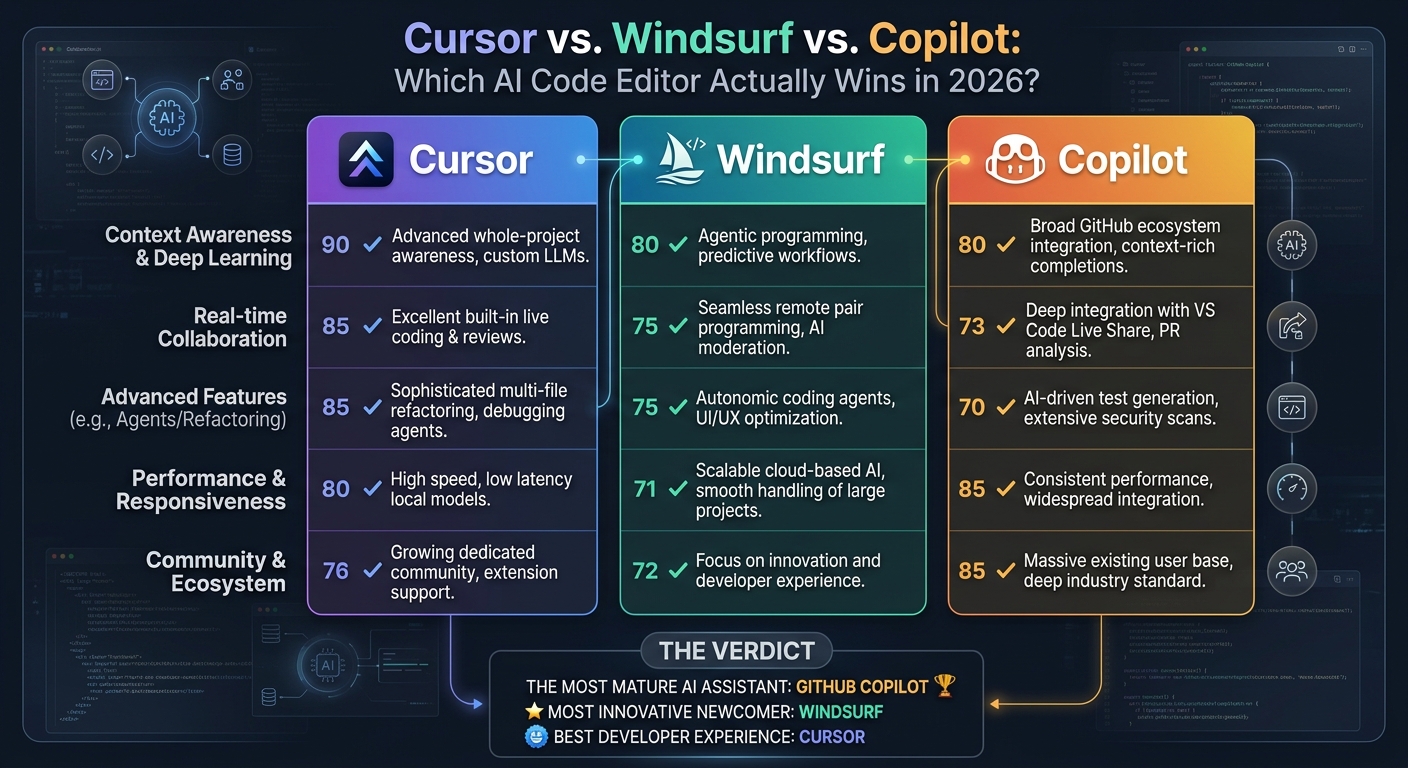
Cursor vs Windsurf vs Copilot: Best AI Code Editor in 2026
Cursor vs Windsurf vs Copilot: Best AI Code Editor in 2026
If you want the best AI code editor in 2026, the choice comes down to Cursor or Windsurf. Both beat GitHub Copilot for developers who rely on agentic workflows. We spent two weeks building a multi-service FastAPI and React app in each editor. Here is exactly how their indexing, multi-file editing, and agent capabilities performed—and which one deserves your subscription.
---
The Three AI Code Editors Compared
Here is what each tool actually is before we break down the details:
- Cursor: A fork of VS Code that treats AI as a first-class citizen. It offers deep codebase indexing, multi-file edits through Composer, and custom rules.
- Windsurf: Codeium's standalone IDE built around "Flows"—an agentic system that switches between co-pilot autocomplete and an independent agent that solves complex multi-step tasks.
- GitHub Copilot (via VS Code): The legacy giant. It has evolved with Copilot Chat and Edits but still operates primarily as an extension rather than a deeply integrated, custom-built environment.
---
1. Deep Codebase Context: How Each Editor Understands Your Repository
An AI editor is only as good as its context window and how well it searches your repository. If it does not know your database schema or utility helper files, it will write code that breaks.
Cursor: The Indexing King
Cursor uses local embeddings to index your entire codebase. When you type @Files or @Folders, it instantly retrieves the correct files. The real power lies in Cursor Composer (Ctrl+I or Cmd+I). Composer does not just suggest code; it writes and modifies multiple files simultaneously. Ask it to "add a new user authentication endpoint and update the frontend fetch utility," and it executes the changes across your backend and frontend in seconds.
Windsurf: The "Cascade" Agent
Windsurf's superpower is its Cascade engine. It does not just index; it maintains a living state of your workspace. It tracks terminal outputs, LSP diagnostics, and file histories. Ask Cascade to fix a bug, and it inspects your code, runs a search, finds the bug, writes the fix, and checks the terminal to confirm the build passes. It feels more like a junior developer working alongside you than a tool answering prompts.
GitHub Copilot: Playing Catch-Up
Copilot's context model has improved with GitHub Copilot Edits, but it still struggles with deep repo-wide awareness. It relies heavily on open editor tabs and explicit @workspace tags. It feels disconnected compared to Cursor and Windsurf because it lives inside the standard VS Code extension API, which limits how deeply it can hook into the editor's core.
Winner: Windsurf for autonomous agent tasks; Cursor for manual, user-directed multi-file edits.
---
2. Real-World Use Cases: Where Each AI Code Editor Excels
To make this practical, here is how these tools handle specific, everyday engineering tasks.
Scenario A: Refactoring a Legacy Codebase
You inherit a messy Node.js service and need to migrate it to TypeScript.
- Windsurf: Point Cascade at the directory and say, "Migrate these five files to TypeScript, fix any implicit
anytypes, and make sure the imports are correct." It works through the files one by one, checks for TypeScript compiler errors in the terminal, and corrects itself along the way. - Cursor: Use Composer. Reference the five files and ask for the migration. Cursor produces clean diffs so you can reject or accept changes line by line. It is faster than Windsurf but requires you to manually run the compiler to verify its work.
- Copilot: You have to open each file, prompt Copilot Chat, and copy-paste suggestions or accept inline edits file by file. It is tedious and slow for this level of refactoring.
Scenario B: Fast Prototyping
You need to spin up a quick CRUD endpoint with validation and unit tests.
- Cursor: Type
@routes/user.pyand use Composer to generate the logic, then reference@tests/test_user.pyto draft the test suite in one go. It is highly efficient and keeps you in control of the design. - Windsurf: Tell Cascade: "Create a user endpoint with validation and write tests for it." Windsurf creates the files, runs pytest in your terminal, sees what failed, edits the code, and runs pytest again until it passes.
- Copilot: You write the comments and Copilot autocompletes the boilerplate. It works well, but you do the heavy lifting of orchestrating the files.
---
3. Hard Limitations: What Each Editor Does Not Tell You
No tool is perfect. Each editor has glaring weaknesses that will frustrate you.
Cursor's Pain Points
- Resource Heavy: Cursor can be a massive memory hog. It indexes constantly in the background, which can make your laptop fan scream during large project loads.
- Composer UI Clutter: When working on massive multi-file edits, the Composer UI can become chaotic. Keeping track of which changes have been accepted, rejected, or partially applied gets confusing fast.
Windsurf's Pain Points
- Loss of Control: Because Windsurf's agent is highly autonomous, it sometimes goes down rabbit holes. It may try to fix a bug by refactoring three files you did not want it to touch, forcing you to revert commits.
- Proprietary Lock-in: Unlike Cursor, which lets you plug in your own API keys (Anthropic, OpenAI, Gemini) and pay only for your usage, Windsurf pushes you harder toward its premium subscription model to get the best out of Cascade.
Copilot's Pain Points
- Lacks Agentic Capabilities: It cannot run terminal commands, inspect build errors, or autonomously fix code in the background. It remains an assistant, not an agent.
- Slow Feature Adoption: Because it must support millions of developers on standard VS Code, Microsoft is conservative with UI changes. You do not get the experimental, hyper-fast UI innovations found in Cursor or Windsurf.
---
Pricing Breakdown for Each AI Code Editor
- GitHub Copilot: $10/month or $100/year. Best value if you just want simple autocomplete and basic chat.
- Cursor: $20/month for the Pro plan (500 fast premium requests, unlimited slow requests). You can also use your own API keys on the free tier, paying only for raw token usage.
- Windsurf: $20/month for the Pro plan. It uses a custom resource credit system for its Cascade agent, which can run out quickly if you let the agent run wild on complex tasks.
---
The Verdict: Which AI Code Editor Should You Choose?
Stop using GitHub Copilot if you write code for a living. It has fallen behind. The productivity gains from agentic workflows in Cursor and Windsurf easily justify their $20 price tag.
Choose Windsurf if you want an AI that acts like an autonomous teammate. If you hate tedious debugging, let Cascade run your terminal, find the errors, and patch them while you grab a coffee.
Choose Cursor if you want to remain the pilot but have a supercharged cockpit. Its multi-file editing (Composer) is incredibly fast, its codebase indexing is flawless, and bringing your own API keys gives you complete control over your LLM costs.
For most senior developers who want tight control over their architecture while moving at 10x speed, Cursor remains the gold standard. But Windsurf is closing the gap fast.