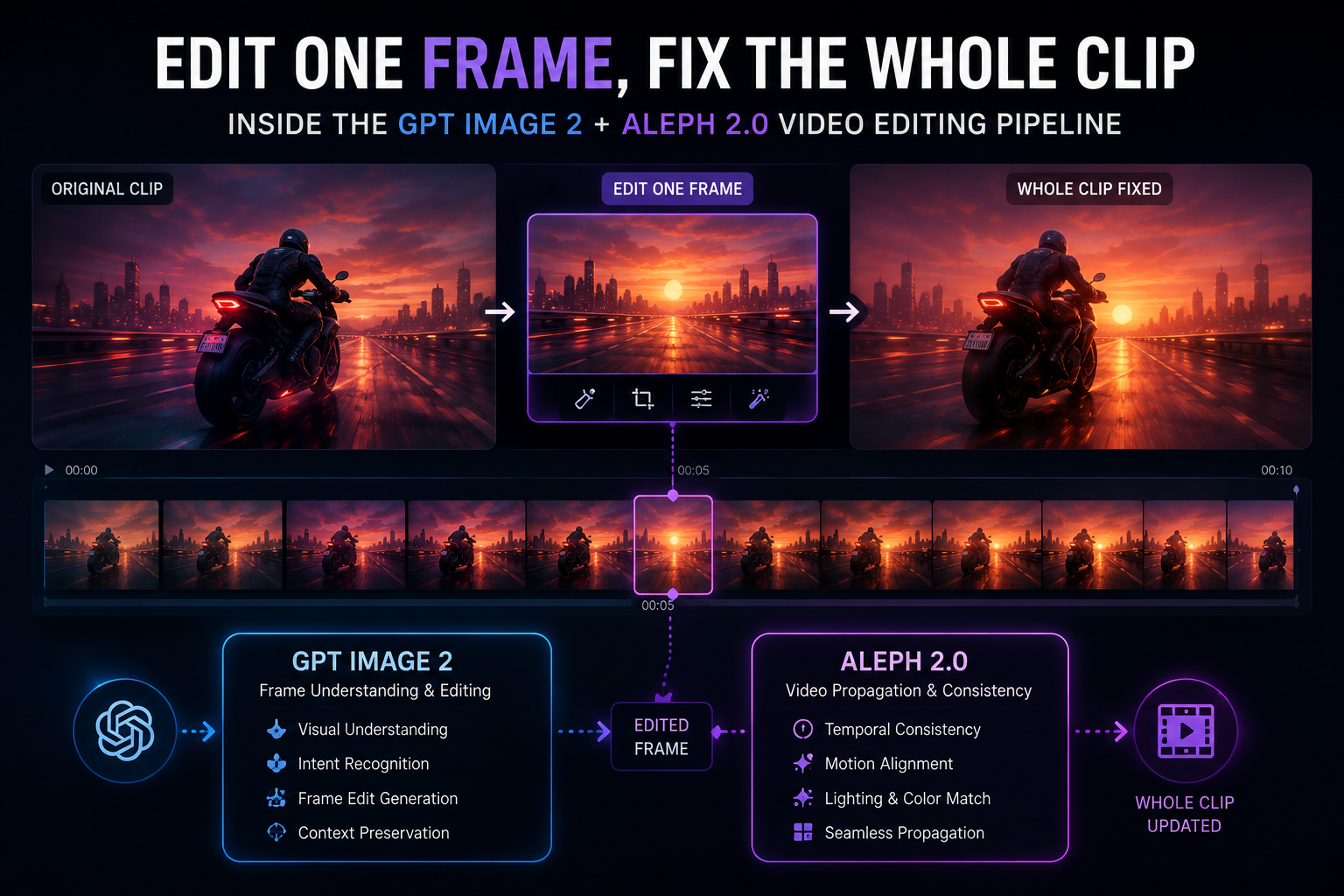
GPT Image 2 + Aleph 2.0: Edit One Frame, Fix Your Whole Video
<content>Editing one frame can now fix an entire video. A new pipeline combining OpenAI's GPT Image 2 and Runway's Aleph 2.0 lets creators change a single reference frame and have that edit propagate automatically across the full timeline — collapsing what used to be a shot-by-shot slog into one instruction.
For the last two years, AI video tools have mostly competed on generation — text in, clip out. July 2026 is the month the conversation shifted to editing, and the workflow now taking shape is one of the more practical advances the space has produced: change one frame, and the rest of the video follows.
How the pipeline works
The pipeline pairs two models built for different jobs. OpenAI's GPT Image 2 handles the first step — generating or editing a single reference image from a plain-language instruction, while keeping everything you didn't ask to change untouched. That reference frame then goes to Runway's Aleph 2.0, which reads it against the source video and propagates the edit across the full timeline: it tracks moving subjects, follows lighting changes shot to shot, and respects cuts and scene transitions instead of blindly repainting every frame the same way.
Why this matters for video editing
Video editing has always been the part of the AI content pipeline that resisted automation the hardest. Image generation solved the single-frame problem years ago; getting a change to hold together across hundreds of frames, multiple camera angles, and moving subjects is a different and much harder problem, because any inconsistency between frames reads instantly as a glitch to the human eye.
Aleph 2.0's pitch is that it treats propagation as an in-context editing task rather than a frame-by-frame regeneration task — it's conditioning on the reference image and the surrounding footage together, not generating each frame in isolation and hoping they match.
The practical unlock is obvious for anyone who has sat through a real edit session. Take a 30-second commercial cut from eight different camera angles. Under the old workflow, updating something as simple as a product's colorway means opening every shot, applying the same change by hand, and checking that it looks identical across cuts. Under this pipeline, you edit the colorway once on a single reference frame and the model carries it through every angle where that product appears.
Where each model takes responsibility
The division of labor matters. GPT Image 2 is doing the creative decision-making — what should this look like — on a single, controllable image where mistakes are cheap to catch and fix before they ever touch motion. Aleph 2.0 is doing the harder, more mechanical job of consistency: making sure that decision survives contact with camera movement, lighting continuity, and cuts.
Keeping those concerns separate is likely why the combination works better than asking either model to do both jobs at once. It also means the workflow is tool-agnostic on the front end — creators can source that reference frame from GPT Image 2, from a local editor, or from a still they shot themselves, and Aleph 2.0 doesn't care which.
Who benefits most
This isn't aimed at replacing editors so much as collapsing the most tedious category of editing work: repetitive, mechanical changes that require zero creative judgment once the first decision is made. Product colorway swaps, wardrobe changes, background replacements, brand refreshes across an existing campaign — these are exactly the tasks that ate hours without ever being creatively interesting.
Filmmakers, marketers, and small content teams without a post-production department stand to benefit most, since the tools that used to require a dedicated VFX pass now fit into a single prompt-and-propagate step.
Known limits
Propagation quality still depends heavily on how clean the source footage is — fast motion, heavy occlusion, and unusual lighting are the conditions where any consistency model is most likely to slip. And "edit one frame, fix the whole clip" only works for changes that are genuinely consistent across the timeline; it's not a substitute for edits that require different treatment shot to shot for a real creative reason.
The bigger pattern
This pairing is a preview of where a lot of AI tooling is heading in the second half of 2026: not one model trying to do everything, but two specialized models handed off to each other, each doing the part it's actually good at. Expect more of this — image models producing controllable, checkable intermediate artifacts that video, audio, or 3D models then propagate, rather than a single end-to-end black box asked to get the whole thing right in one pass.</content>